


How to Create a Listing on Airbnb
Published: May 31, 2024
Last updated: September 25, 2026

Bram Gallagher
Key Takeaways
- Detailed and accurate listings attract potential guests and set clear expectations, leading to higher satisfaction and better reviews.
- Specify your property type, provide detailed information about the space, list all amenities, and use high-quality photos.
- A competitive and flexible nightly rate is the bread and butter of a profitable Airbnb listing.
Are you looking to turn your spare room or investment property into a steady income stream? The first step to transforming your property into a profitable Airbnb rental begins with creating a well-crafted listing. Whether you're a first-time host or looking to optimize your existing listing, this step-by-step guide will walk you through listing on Airbnb.
What Are the Airbnb Listing Requirements?
If you're considering going to list your short-term rental property on Airbnb, it's important to understand the requirements to ensure your guests have a safe and enjoyable experience. Here's what you need to know.
Age Requirement for Hosts
All hosts must be at least 18 years old to open an Airbnb account. This age restriction ensures that hosts have the legal capacity to enter into agreements necessary for offering a rental property.
Property Requirements
Airbnb accepts many different kinds of listings as long as they meet the following criteria:
- The space is only used for lodging.
- The accommodation, if a mobile home, sailboat, yacht, or other vessel, is semi-permanently attached to a set location and will be parked in a privately-owned space during the reservation.
- The listing is accurately represented, located where the host says it is, and is bookable by the host.
Other Listing Requirements
In addition to the age requirement, the listing page at the time of booking must accurately describe the property and amenities that will be available to the guest from check-in to check-out. Airbnb outlines the following criteria for listings:
- Booking Details: Once a booking is accepted, any changes to the booking details (such as dates or prices) should only be made with the guest's prior consent.
- Location Information: The listing’s location must be correctly represented, including the map pin and address. Disclose any factors that may affect noise levels in the surrounding area.
- Type, Size, and Privacy: Clearly describe the type of lodging being offered, whether it’s a private room, an entire home, etc. Detail the setup, such as the number of bedrooms and bed sizes. Specify the level of privacy, including whether there is an on-site property manager or other guests.
- Property Representation: The property provided must match what was booked. The photos and description should accurately represent the space. Substituting one listing for another is only acceptable with the guest's prior agreement and acceptance of a trip change request.
- Amenities and House Rules: List all amenities and house rules accurately. Essential amenities include toilet paper, soap, towels and pillows for each guest, and bedding. Any restrictions on amenity access, such as limited pool hours, should be clearly communicated.
For more tips and insights on becoming a successful host after you list on Airbnb, explore Airbnb Hosting 101: A Beginner’s Guide.
10 Steps to Create a Listing on Airbnb
You want to get your Airbnb listing up and running but are not sure where to start. Don’t worry—we’ve all been there. The good news is it's easier than you think.
Airbnb breaks down the listing process into 2 primary steps: Tell us about your place, make it stand out, and finish up and publish.
Follow this step-by-step guide to create a listing that attracts potential guests and maximizes your rental income.
1. Choose Your Property Type
Airbnb has 31 property type options, ranging from houses to barns to windmills.
Once you've selected your property type, you'll indicate what type of space guests can expect. You’ll to select from the following options:
- An entire place: Offers complete privacy for guests, ideal for families or larger groups.
- A room: Allows you to host while staying on the property, perfect for solo travelers or couples.
- A shared room: Budget-friendly option where guests share a space, similar to hostel accommodations.
2. Enter Your Exact Location on Airbnb’s Map
Enter your property's exact location on Airbnb's map. You can choose whether to share your exact or approximate location with guests. Airbnb will show you a pin on the map and you'll be prompted to confirm whether it's accurate.
You'll have the chance to highlight nearby attractions, transportation options, and neighborhood features in your listing description later on. Keep in mind that potential guests won't know your exact location until a booking is confirmed.
3. Indicate Details About the Space
Airbnb will prompt you to provide detailed information about the space itself. This helps guests determine if your space meets their needs. Be prepared to give details such as:
- How Many Guests: Specify the maximum number of guests your space can accommodate.
- How Many Bedrooms and Bathrooms: List the number of beds and bathrooms available.
- Beds: The number of bedrooms isn't necessarily equal to the number of beds. For example, you might have more than one queen-size or twin bed per bedroom, or perhaps you have a couch that turns into a bed in your living room.
4. List Amenities
Airbnb breaks out amenities into three categories: guest favorites (the most common amenities), stand-out amenities, and safety items. Guest favorite amenities to list include:
- Wi-Fi
- Kitchen
- TV
- Free parking on premises
- Paid parking on premises
- Washer
- Air conditioning
- Dedicated workspace
Standout features include a hot tub, outdoor dining area, pool table, or fireplace. Don't overlook this step in the listing process--AirDNA found that certain amenities directly impact overall revenue.

5. Add High-Quality Photos
Airbnb requires at least 5 photos for a new listing. Invest time or money in high-quality photos to showcase your property at its best. Include:
- Exterior Photos: Show the building, garden, or surrounding area.
- Interior Photos: Capture all rooms, ensuring good lighting and cleanliness.
- Unique Features: Highlight special amenities, like a clawfoot bathtub, or unique aspects of your space, such as a window seat in the library.
Go the extra mile by including a link to an Airbnb video tour in your listing description. Video tours help guests to better imagine their guest experience in your space.
After you upload your images, you'll have the option to reorder them and choose a cover photo, which appears more prominently.
6. Write Your Title
A compelling titlecan be the difference between a guest scrolling past your listing or taking a moment to learn more.
Your title should be concise yet descriptive, highlighting the best features of your property. Use keywords that potential guests might search for, like "views" or "waterfront" or “patio.” Your title should strive to stand out in the search results and also still speak to your ideal guest.
You have 32 characters to make an impression on potential guests. We've got an entire article dedicated to nailing your Airbnb title with catchy examples. You can always change your title later, so don't labor too much over your decision during the initial listing process.
7. Provide a Property Description
Airbnb will prompt you to choose two highlights, which they'll use to get your description started. The highlight options are:
- Peaceful
- Unique
- Family-friendly
- Stylish
- Central (Location)
- Spacious
Next up comes the written description. Airbnb will draft an opening sentence for you based on the highlights you chose, which you can keep or scrap. Provide a brief, honest overview of your space, including layout, decor, and unique aspects. Mention nearby attractions and transportation options to give guests a sense of the neighborhood. Highlight what types of experiences guests can in your space and the surrounding area.
Read our guide on how to write an effective Airbnb property description for more ideas on how to stand out in the search results.
7. Decide How You'll Confirm Reservations
Choose between Instant Book, which allows guests to book stays automatically, or manual approval of booking requests. Airbnb weighs host response times heavily in their algorithm for listing visibility in search results as well as for Superhost designation. This means you need to be on top of your communication game and review booking requests in a timely manner if you choose to manually screen reservation inquiries.
AirDNA data indicates that properties with Instant Book enabled have higher occupancy rates, average daily rates (ADR), and revenue per available rental (RevPAR). Explore our article on Instant Book to get a fuller picture of the pros and cons before deciding!
8. Set Requirements for Your First Guest
Airbnb gives you the option to require your first guest to be an experienced Airbnb user, that is, someone who a good track record on Airbnb who can offer tips for how to be a great host. Keep in mind that it might take a little longer to receive an initial reservation with this filter in place. After your first reservation, your listing automatically becomes available to any Airbnb guest regardless of experience.
7. Set Your Nightly Price
Airbnb will generate a suggested price for your listing, with a subheading communicating the total price that the guest will see during check-out. The total price is higher as it includes the guest service fee. Note that your earnings won't match the exact price that you set because of taxes.
Airbnb also provides a pricing range based on similar listings. You can look at a map of your area to see what Airbnb properties in close proximity to yours have charged, on average, over the last year. The average listing price will only take into account booked listings, i.e. active listings that had reservations during that date range.
The right nightly price is high enough to remain competitive with other Airbnbs in the area, but still reasonable enough to attract guests. It’s a tricky balance and figuring out where that sweet spot is can feel daunting. Here’s how you can get started:
- Research Similar Listings: Look for properties in your area with similar amenities, locations, and guest capacities to determine a fair and competitive rate for your listing.
- Consider Dynamic Pricing Tools: These tools automatically adjust your nightly rate based on demand, seasonality, and local events. As a result, you’re always competitively priced without constant manual updates. You could use Airbnb Smart Pricing inside the app, but dedicated dynamic pricing tools like AirDNA’s Smart Rates™ allow you to create a more tailored pricing strategy.
- Understand Fee Structures: Airbnb offers different fee structures, including a split-fee option that divides the cost of Airbnb services between host and guest or a host-only fee where the host pays the entire service fee under certain circumstances (check out our guide on Airbnb vs Vrbo to learn.
8. Add Discounts
After you choose your nightly rate, you'll have the option to add discounts. Airbnb will automatically enroll you in 3 discount schemes unless you opt out:
- New listing promotion: offer 20% off your first 3 bookings
- Weekly discount: 10% off for stays of 7 nights or more.
- Monthly discount: 15% off for stays of 28 nights or more.
Whether or not discounts are a worthwhile hosting strategy depends on your situation and how quickly you want to earn money. Offering discounts can motivate guests to book, leading to higher occupancy and your first ratings sooner.
Reviews are an important facet of your listing's credibility and appeal to visitors and it might be worthwhile to earn less money initially if it helps to build your reputation. On the other hand, if it's not your first listing on Airbnb and/or you have Superhost status for another property, your hosting reputation alone might be enough to vouch for a newly listed property.
9. Required Disclosures
Hosts must tell Airbnb if they have exterior security cameras, noise decibel monitors, or weapons. Interior security cameras aren't allowed, regardless of whether they're turned off.
Noice decibel monitors are acceptable but cannot be located in a bathroom, bedroom, or sleeping area. Any mechanism that can be used to fire a projectile is considered a weapon. This includes tasers or pepper spray.
10. Complete a Final Review and Go Live
Before activating your listing, make sure everything is in tip-top shape:
- Double-Check All Information: Verify that all details in your listing are accurate and up-to-date. This includes descriptions, photos, amenities, and pricing.
- Test Your Listing: Before finalizing and publishing your listing, Airbnb provides an option to preview it from a guest perspective. Check for any errors or missing information and verify that it presents your property in the best light.
- Activate Your Listing: Once you’re satisfied with all the details, publish your listing and start welcoming guests. Note that it can take up to 72 hours for your listing to appear on Airbnb.
Note that you'll be able to set up your calendar and adjust other settings, such as your cancellation policy, after your listing has been published. We cover the remaining steps below.
Listing Settings
The process of adding a new property to Airbnb excludes some of the finer details. You must edit house rules, which includes things like your pet policy and check-in time, from the listing editor after your property has been published to the site.
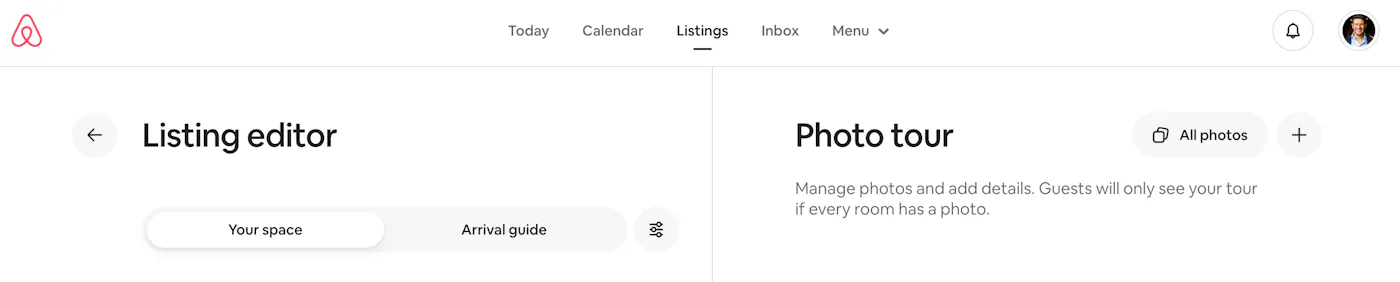
You can access the listing editor by choosing 'Listings' from the navigation menu at the top of the hosting portal and then clicking on your new listing. Your property dashboard is bifurcated into a listing editor on the left and a photo tour on the right. You can toggle between 'Your space' and 'Arrival guide' on the listing editor side.
Make Check-In and Check-Out Times Clear
Under Listing editor, toggle to 'Arrival guide'. Check-in and check-out details are the first option at the top. You can also edit your check-in information in the 'House rules' section of 'Your space'.
Typical check-in times are in the afternoon, which allows you time to prepare the space after previous guests check out. Standard check-out times are in the morning, giving you enough time to clean and prepare the property for the next guest.
Make an informed decision about check-in and check-out times based on your market. If you’re in a remote area where daily flights in or out are limited, consider adjusting your check-out time to better align with departure times. Consider why people are traveling to your city–if it’s popular for its nightlife, you might have happier guests and receive better reviews if you offer a late check-out time.
Clear check-in and check-out times help guests plan their stay and can influence their booking decision. Don't forget to provide details on the check-in method, particularly how the key exchange will happen or what the code is if you opt for a smart lock.
Set Your Cancellation Policy
Under 'Your space' in the Listing editor, scroll down to 'Cancellation policy'. Set a standard policy as well as a long-term policy. Standard policies apply to any stays less than 28 days and long-term policies to stays over that length. Airbnb standard cancellation policy options include Flexible, Moderate, Firm, Strict, Super Strict 30 Says and Super Strict 60 Days. Long-term stay policies are limited to just Firm or Strict.
In addition to choosing a cancellation policy, you can also offer a non-refundable option. Guests pay 10% less with a non-refundable option, but you get to keep your payout no matter when the guest cancels. This choice appears to guests at checkout, when they're given the option to select your standard rate and cancellation policy or the non-refundable, slightly discounted rate.
We cover cancellation policies and the factors to consider when choosing one in our article on Airbnb cancellation policies.
Add House Rules and a Guidebook
Toggle to the 'Arrival guide' in the Listing editor. You'll have the option to fill in fields such as 'House manual', 'House rules', and 'Guidebooks'.
Cover any important house rules in your listing to set expectations, such as policies on noise, smoking, pets, or additional guests. Share tips on how to access and control the internet, TV, smart devices, and temperature.
If you offer a guidebook to guests after booking, you can upload it directly to your listing in the Listing editor. Consider mentioning its availability in your listing description to highlight your commitment to a great guest experience. The guidebook should include recommendations for local restaurants, attractions, transportation options, and emergency contacts.
Set Up Your Calendar and Booking Settings
You can adjust your calendar availability as well as seasonal rates under the Calendar tab of the navigation menu at the top of the Airbnb hosting portal.
Adjust your availability settings to block off dates when the property is not available. Set your booking preferences for minimum stay lengths and advance notice requirements to help manage your schedule and prepare for guest arrivals.
You should also regularly update your calendar. This is especially important if you’re listing on multiple platforms. Linking your Airbnb and Vrbo calendars if you list on more than one platform is essential for avoiding double bookings. You may want to consider a host management tool like Uplisting if your listing is on multiple platforms.
FAQ’s
What are some common mistakes to avoid when listing on Airbnb?
Common mistakes that lead to less bookings include setting unrealistic prices, having strict cancellation policies, and not being transparent about additional fees. It's also important to keep your calendar updated to avoid double bookings. For more details, see our guide on Listing Your Vacation Rental on Multiple Platforms.
How can I set competitive pricing for my Airbnb listing?
Research similar listings in your area to set a fair and competitive rate. Consider using dynamic pricing tools to adjust your rates based on demand, seasonality, and local events. This keeps your property competitively priced without needing constant manual updates.
Why is a flexible cancellation policy important?
Guests appreciate flexibility, especially when travel plans change unexpectedly. Offering a flexible cancellation policy can make your listing more attractive to guests and increase your booking rate. Keep in mind that, in some ways, Airbnb rewards hosts that offer more flexible cancellation policies. Hosts are forced to take on the full cost of Airbnb service fees (known as the Host-Only fee) if they have super-strict cancellation policies.
How do I keep my calendar updated to prevent double bookings?
Regularly update your listing’s calendar availability to reflect changes and prevent double bookings. If you're listing your property on multiple platforms, sync your calendars to avoid overlaps.
How can I get positive reviews from guests?
Keep your space clean, provide a hassle-free check-in process, and communicate promptly with guests. For more tips, read our article on How to Get 5-Star Review.
What should I do if I encounter double bookings?
Use tools to sync your calendars across platforms to prevent double bookings. If an overlap occurs, communicate immediately with affected guests and offer solutions. Learn more in our guide on how to handle double bookings.
Does it cost anything to list on Airbnb?
It’s free to list on Airbnb. However, Airbnb charges a service fee when you receive a booking. This fee is typically a percentage of the booking subtotal and helps cover the cost of running the platform and providing support. For detailed information, visit Airbnb’s service fee overview.
ARTICLE SUMMARY
If you're ready to list on Airbnb but unsure about how to set up your listing for success, we’ve got you covered. Our 11 easy-to-follow steps will help you create a standout listing that’ll get booked by guests in no time.
Bram Gallagher
AirDNA Director of Economics and Forecasting
Bram Gallagher is an Economist at AirDNA, specializing in uncovering insights that drive smarter short-term rental decisions. He put his Ph.D. in Economics from the University of Georgia to work researching and forecasting hotel data with CBRE prior to joining AirDNA, as well as teaching economics at a number of universities. In his spare time, Bram enjoys making wooden furniture with hand tools.

Get started with AirDNA today.
Powerful, easy-to-use tools that help hosts and investors succeed in the short-term rental market.
Try for free