

 Calculate Revenue
 Research Markets
 Find For Sale Properties
 Compare My Listing
 STR Revenue Calculator
 Custom Comp Sets
 Submarket Insights
 Custom Search Filters
 Rate Recommendations
 Performance Benchmarking
 Competitor Comparison
 Owner Contact Details
 Property-level performance data
 Tourism Insights
 Real Estate Investment Analytics
 About Us
 Sales
Sales Support
 Press
PressWhy You Should List on Google Vacation Rentals and How to Do It
Published: October 25, 2024
Last updated: September 25, 2026

Bram Gallagher
Key Takeaways:
- Google Vacation Rentals is a metasearch engine that displays vacation rentals across Google Search, Maps, and Travel.
- Listing on Google Vacation Rentals can increase your property's visibility without the fees associated with traditional online travel agencies.
- You can list on Google Vacation Rentals through partner booking platforms (like Booking.com or Tripadvisor) or by using a compatible Property Management System (PMS) such as Uplisting.
Let’s face it—Google is practically the answer to everything. From settling dinner table debates to finding the best pizza joint in town, it's your go-to for just about any inquiry. What started as a humble search engine has morphed into an empire, offering maps, business reviews, and now? Vacation rentals.
That’s right, Google is now in the game of helping travelers find the perfect place to stay. As a host, listing your property on the world’s largest search engine could give you a major advantage—and it's easier than you think.

What Is Google Vacation Rentals?
Google Vacation Rentals (GVR) is part of Google’s larger travel ecosystem, allowing travelers to easily discover vacation rental properties across the web. When users search for specific destinations or accommodations on Google Search, Maps, or Google Travel, GVR aggregates listings from various vacation rental platforms and displays them directly in the search results.
Unlike online travel agencies (OTAs) such as Airbnb, Google Vacation Rentals acts as a metasearch engine—meaning it doesn’t handle bookings directly. Instead, it directs users to your chosen booking page, giving you full control over your reservation process. This is a game-changer for hosts looking to reduce reliance on OTA platforms that often come with commissions or fees.
Where do vacation rentals appear on Google?
Vacation rentals (or holiday rentals) are displayed across three key Google platforms:
- Google Search: When travelers search for accommodations, vacation rental options appear directly in the search results. For example, a search like "accommodation in London" will show available properties in an interactive widget. Clicking on a listing sends users to Google Travel for more details.
- Google Maps: Searching for rentals on Google Maps places location pins on the map, indicating nearby properties along with their nightly rates. It’s a quick way for travelers to see what's available in their desired area.
- Google Travel: Google Travel provides a platform similar to Airbnb, where users can filter rentals by amenities, price, and property type. Listings include reviews, images, and other essential information.
Each platform allows users to search for and explore vacation rental options in a way that fits their needs, whether they’re browsing from a desktop or on the go via mobile.

Why Should Hosts Consider Listing on Google Vacation Rentals?
Google is the world’s largest search engine—meaning if you list your property on Google Vacation Rentals, you’ll tap into an enormous audience of potential guests. Let’s say, on average, that “accommodations in Boston” is used as a search inquiry 10,000 times per month. If your listing appears at the top of those results, that’s a massive pool of travelers who could book with you directly.
Here’s why this matters:
- Increased visibility: Google Search is where many travelers start their research, and being listed on GVR ensures you’re not just part of those search results, but at the very top. Featured GVR listings are given preference ahead of organic search results.
- No direct commissions: OTAs often charge a commission per booking, which can eat into your revenue. Google, on the other hand, doesn’t take a cut from direct booking, despite them driving increased traffic to your listing. If you have a direct booking website, listing on GVR means guests book directly with you—no middleman, no fees.
- Compete with Airbnb: One crucial distinction—Google Vacation Rentals doesn’t pull listings from Airbnb. If you’ve ever felt overshadowed by Airbnb’s sheer volume of listings, this is your chance to stand out. Plus, GVR’s wide reach across Google platforms means you’re visible on a bigger stage without the immediate competition of Airbnb properties.
Beyond the exposure and cost benefits, Google Vacation Rentals by owner gives you flexibility. In the question of Google Vacation Rentals vs Airbnb, the answer can be “both.” GVR offers an additional way to attract bookings without abandoning your favorite OTAs.
Enjoy the confidence & focus you need to scale your vacation rental business
With a reliable VRM solution you can trust, Uplisting can help you grow your business without wasting time on double bookings, unhappy guests, upset clients and worrying what could go wrong next.
How to List on Google Vacation Rentals
Getting your property listed on Google Vacation Rentals (GVR) can greatly boost your visibility, but the process depends on how you currently manage your bookings. Here are the three ways to list on Google Vacation Rentals
Through a booking platform
If your property is already listed on an online travel agency (OTA) or short-term rental platform that partners with Google, getting listed on Google Vacation Rentals (GVR) can be straightforward. Google pulls listings from OTAs like Tripadvisor, Booking.com, and others.
Some of the short-term rental sites that Google partners with include:
- Tripadvisor
- RedAwning
- HolidayLettings
- Cottages.com
- Snaptrip
- Sykes Cottages
However, neither Airbnb or Vrbo are directly integrated with GVR, meaning that if you're solely using those platforms, your property will not automatically appear on GVR.
To have your listings from Airbnb or Vrbo on Google Vacation Rentals, you will need a vacation rental software like Uplisting that integrates with both platforms. This allows you to sync your listings across multiple platforms, including GVR.

With a Property Management System (PMS)
For hosts looking to avoid OTA fees and manage bookings independently, a Property Management System (PMS) is a great solution. Systems like Uplisting, which is compatible with Google Vacation Rentals, allow you to list your properties directly on GVR while directing traffic to your own booking site. Get the benefits of Google’s vast audience—without paying OTA commissions.
You maintain full control over your bookings while leveraging Google’s search traffic when using a PMS. We show you how to do that inside Uplisting later on in this article!
Direct integration with Google
If you manage over 5,000 properties, you can apply for direct integration with Google Vacation Rentals. This option lets you bypass OTAs and PMS’s, avoiding third-party fees. After submitting Google’s interest form, you'll be assigned a technical account manager to provide support and ensure policy compliance.
However, this route is best suited for large-scale operations and is not practical for smaller hosts.
You’re in great company
Some of the largest short-term rental operators (with 250+ properties) rely on Uplisting's software to scale their businesses.
Requirements for Listing on Google Vacation Rentals
Certain criteria must be met to ensure your property is searchable and bookable through Google’s platforms:
1. Direct booking engine: Your property must be listed through a GVR-partnered booking platform or property management system (PMS) such as Uplisting, Vrbo, or Tripadvisor. These platforms manage bookings and sync property details to Google.
2. Complete property information: Essential details include:
- Property Address (required for Google Maps and location-based searches)
- Base Rate (starting nightly price)
- Maximum Capacity (guest limit)
3. Payment Processor: A secure payment system, typically through your PMS or booking platform (e.g., Stripe or PayPal), is necessary to handle guest transactions.
Currently ineligible listings
Some types of properties are not eligible to be listed in Google Vacation Rentals search results:
- Individual homeowners (i.e. property owners listing their primary residence)
- Peer-to-peer rentals (e.g., Airbnb-style home-sharing)
- Individual rooms
- Partial homes (e.g., subleased or shared spaces)
Google is partial to entire-home listings and professional accommodations, that is, vacation rentals that are managed professionally or listed as part of a formal business entity.

Is Google Vacation Rentals Right for You?
If you’re a host who already has a direct booking website, or you’re looking to reduce reliance on OTAs like Airbnb, Google Vacation Rentals (GVR) can be a game-changer and one of the best vacation rental sites for owners.
Is GVR right for your specific strategy, though? Here’s why it might be:
- You’re using a direct booking site: For hosts with a property management system (PMS) like Uplisting that supports direct bookings, GVR offers an ideal way to boost visibility while keeping guests on your booking platform. By listing on GVR, you leverage Google’s vast audience without sacrificing any revenue to OTA commissions.
- You want to build your brand: If you’re focused on establishing your short-term rental as a trusted brand beyond just another listing on Airbnb or Vrbo, GVR gives you the platform to do so. It’s a powerful way to showcase your property in search results, reinforcing your direct booking brand while reaching a larger audience.
- You manage multiple listings or properties: For those with a portfolio of properties, managing bookings via GVR through a PMS allows you to streamline the booking process and the guest experience across all listings. Guests are directed to your website, where you can offer personalized experiences and special deals, ultimately driving repeat bookings and brand loyalty.
One of the real advantages of GVR lies in SEO. Since Google can’t fully crawl Airbnb or other OTA listings, your visibility on those platforms is limited to just the basics—titles, a few keywords, and maybe some sparse descriptions. However, with a direct booking site integrated with GVR, you have the power to fully optimize your listings for Google’s search algorithm.
Ultimately, GVR is an opportunity to grow your STR business while gaining independence from booking platforms. If you’re ready to invest in your brand and take direct control of your bookings, integrating your properties with GVR is a smart step forward.

Getting Listed on Google Vacation Rentals with Uplisting
Uplisting is a vacation rental management software (VRM) offering seamless management of bookings, pricing, and availability across booking platforms.
When you connect Uplisting to GVR, the system syncs all of your property’s key details, such as descriptions, photos, pricing, and availability, guaranteeing that your listings are always up to date on Google. Guests searching for vacation rentals in your area can view your property, select their dates, and complete their booking through an Uplisting-powered page. This gives you the benefits of Google’s exposure while handling bookings independently of OTAs (and their fees).
How to set up Google Vacation Rentals with Uplisting
Here’s a step-by-step guide to getting your property listed on Google Vacation Rentals using Uplisting:
1. Activate Google Vacation Rentals integration:
- Log in to your Uplisting account.
- Go to the Booking sites tab on each property
- Select 'Publish' next to the Google booking site.
- Follow the prompts to connect your properties to Google.
- Uplisting will automatically sync your property’s information, including photos, pricing, and availability. Double-check that your property details are complete and accurate to ensure they display correctly on Google.
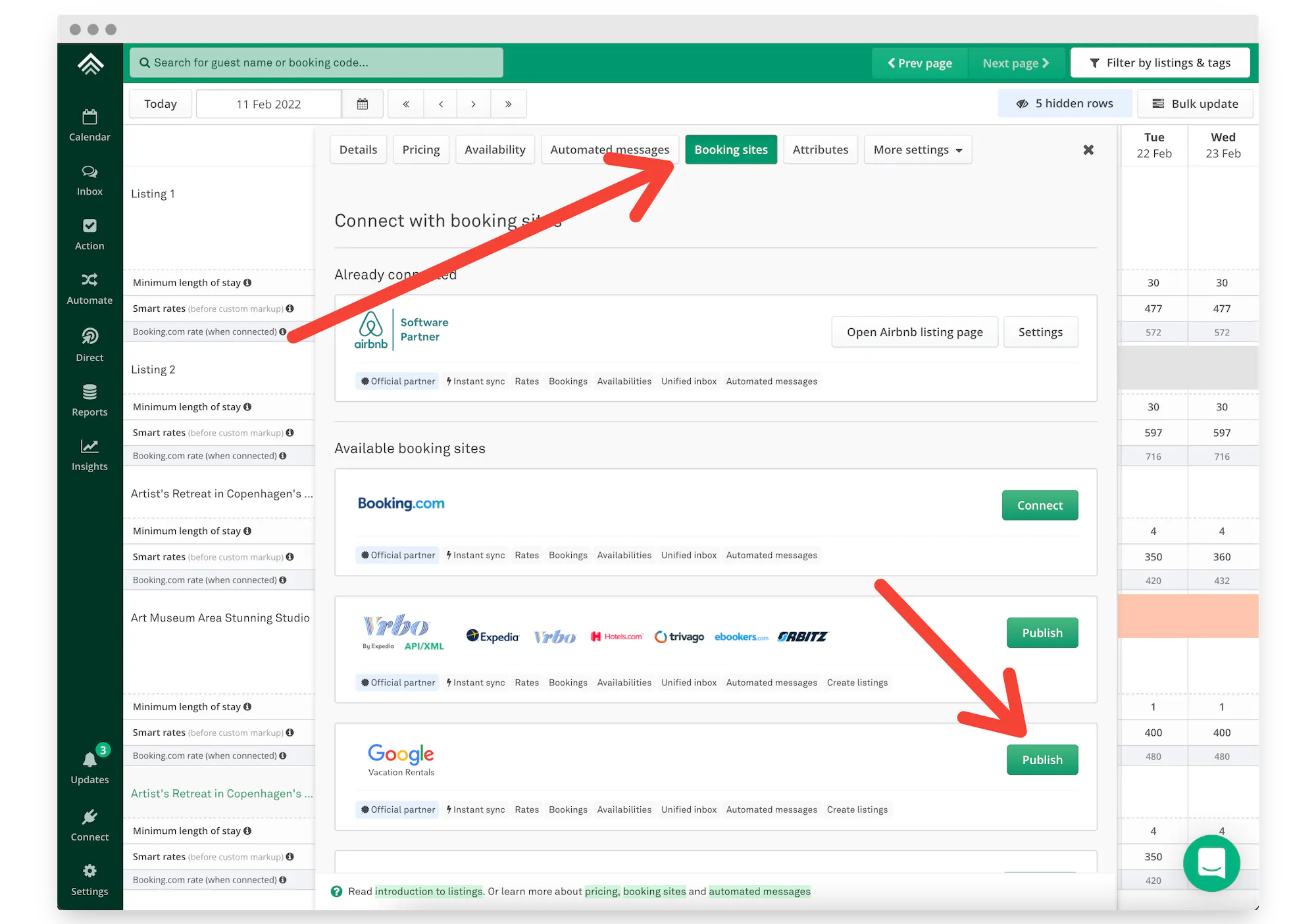
Note: If you're a new Uplisting member, your property won't sync with Google until you subscribe to Uplisting’s services. This ensures that subscribed members' properties are prioritized and published on Google.
2. Wait for Google to publish your listing
Once your data is synced, Google typically aims to publish your property within 1 week, but in some cases, it can take up to 2 weeks.
3. Go Live and manage bookings with Uplisting
After your listing is live on Google, travelers can find your property and book directly through your Uplisting booking page. Payment is processed through your Stripe account associated with your Uplisting account, and bookings are synced back to Uplisting as Google bookings.
From there, you can manage everything just like a direct booking, using Uplisting’s tools for automated messaging, calendar syncing, and guest management.
Frequently Asked Questions
Where can I list my vacation rental for free?
While many online travel agencies (OTAs) charge fees for listing and booking, platforms like Uplisting allow you to connect to Google Vacation Rentals without paying OTA commissions. However, you will need an Uplisting account to connect to GVR. Even if you run your own direct booking site, there will still be costs, such as payment processing fees through Stripe or PayPal.
You can avoid higher OTA commissions and gain more control over your bookings, making it easier to find the strategy that works best for your property, by investing in a PMS like Uplisting,
Why don’t vacation rentals qualify for Google Business listings?
Vacation rentals don’t qualify for Google Business listings because Google treats them differently from traditional businesses. Google Business listings are designed for physical businesses with a consistent presence, like restaurants or shops, where customers visit in person. Since vacation rentals operate as temporary accommodations and not as walk-in businesses, they are listed under Google’s Travel and Vacation Rentals platforms.
Why do some vacation rental properties appear on Google Maps?
Vacation rental properties appear on Google Maps when they are listed through platforms or property management systems (PMS) that sync with Google Vacation Rentals. For instance, properties listed on platforms like TripAdvisor, Booking.com, or Uplisting may show up in Google Maps searches, complete with location pins and pricing.
How do I know if my property is already listed on Google Vacation Rentals?
If your property is listed on a Google-partnered OTA, like Booking.com, or Tripadvisor, it may already be visible on Google Vacation Rentals. Try searching for vacation rentals in your area on Google and look for your listing. Alternatively, check with your OTA or PMS to see if they automatically sync your property with Google.
How can I get my vacation rental to rank higher in Google search results?
Focus on optimizing your property listing with high-quality photos, catchy descriptions, and competitive pricing to improve your vacation rental’s ranking in Google search results.You can also improve your website’s SEO by adding relevant keywords, building backlinks, and making your site mobile-friendly.
Create 5-star guest experiences
With Uplisting, you can send the right messages at the right time on all booking sites. Read and respond to guest messages in a single, unified inbox — whether you’re at the office or on the go.
ARTICLE SUMMARY
Imagine your vacation rental catching the eye of millions of travelers before they even think about checking Airbnb. Sounds too good to be true, right? Not with Google Vacation Rentals. In this article, we’ll look at how to use the world's biggest search engine to increase your bookings.
Bram Gallagher
AirDNA Director of Economics and Forecasting
Bram Gallagher is an Economist at AirDNA, specializing in uncovering insights that drive smarter short-term rental decisions. He put his Ph.D. in Economics from the University of Georgia to work researching and forecasting hotel data with CBRE prior to joining AirDNA, as well as teaching economics at a number of universities. In his spare time, Bram enjoys making wooden furniture with hand tools.
