

 Calculate Revenue
 Research Markets
 Find For Sale Properties
 Compare My Listing
 STR Revenue Calculator
 Custom Comp Sets
 Submarket Insights
 Custom Search Filters
 Rate Recommendations
 Performance Benchmarking
 Competitor Comparison
 Owner Contact Details
 Property-level performance data
 Tourism Insights
 Real Estate Investment Analytics
 About Us
 Sales
Sales Support
 Press
PressHow to List on Multiple Short-Term Rental Websites
Published: August 23, 2024
Last updated: September 25, 2026

Bram Gallagher
Key Takeaways
- Listing on multiple short-term rental sites can significantly increase your bookings and revenue.
- Starting with one online travel agency allows you to master the platform’s nuances before expanding to multiple channels.
- Using channel management software helps synchronize your listings across platforms, reducing the risk of double bookings and saving you valuable time.
You've bought, furnished, and stocked a short-term rental property—so now where do you advertise it? Airbnb is often recommended, but you’ve also heard of platforms like Vrbo and Bookings.com.
Any of these short-term rental (STR) websites are good options, but why hold yourself to just one? Data shows that listing your property on multiple platforms can help increase bookings and maximize revenue. Now, the question is how to successfully list your property on more than one STR site without double-booking, missing guest inquiries, or failing to optimize your daily pricing across listings.
This guide walks you through the step-by-step process of listing on multiple STR platforms, discusses the tools that can make this task manageable, and highlights best practices to ensure your multi-platform strategy succeeds.
What to Consider Before Listing on Multiple Short-Term Rental Websites
There are pros and cons to listing your property on multiple vacation rental platforms. The most obvious pro is the potential to attract more bookings, while the most obvious con is the fact that juggling multiple OTAs can complicate things.
It can be wise to start with just one platform. By focusing on a single OTA, you reduce the learning curve, allowing yourself time to master that platform’s user experience and policies. This approach also gives you more flexibility to hone your hosting skills, from communicating with guests to managing daily operational tasks like housekeeping, maintenance, and inventory management.
Once you're comfortable and confident, consider expanding to multiple platforms. Data shows that hosts who list on both Airbnb and Vrbo see higher occupancy rates. In 2023, for example, properties listed on both platforms had an average occupancy rate of 58.3%, which is more than 4% higher than those listed on Airbnb alone and over 6% higher than those on Vrbo alone. This difference holds true across various property sizes, bedroom counts, and price tiers.
However, remember that expanding to multiple platforms does require you to manage your listings efficiently. At the very least, this means budgeting time to learn the intricacies of each platform's interface, policies, and best practices. If done well, the rewards in terms of increased bookings and revenue can be substantial.

How to List Your Property on Multiple Short-Term Rental Websites
Follow these steps to list your vacation rental on multiple platforms:
Step 1: Research channel options
Not all platforms are created equal, and your success requires careful research to avoid unnecessary fees and time spent on unproductive sites.
When pinpointing the right STR sites to list on, consider:
- Location: Different platforms perform better in various regions. For instance, Airbnb has a broad international reach, making it ideal for properties in global tourist hotspots. Vrbo, on the other hand, tends to excel in U.S. vacation destinations. Booking.com is particularly effective at attracting guests who typically book hotels, which could be beneficial in urban areas or regions with high tourist footfall.
- Niche: Your property's niche can dictate which platforms are most suitable. For example, if you have a luxury property, platforms like Onefinestay might be more appropriate. If your property is more budget-friendly or caters to adventure travelers, sites like Whimstay.com, which targets last-minute bookings, could be more effective.
- Target your ideal guest: Understanding who your ideal guest is—whether it’s business travelers, couples, families, or solo adventurers—can help you choose the platforms that will bring in the most bookings. The type of guest you aim to attract should guide your platform selection. For instance, if you’re targeting families, Vrbo is known for being family-friendly, with many properties offering multiple bedrooms and amenities tailored to longer stays.
Of course, there are the major short-term rental websites—Airbnb, Vrbo, and Booking.com—but there are plenty of others out there. Though they might not have the reach of Airbnb, they offer the benefit of catering to a unique niche.
Don’t overlook platforms like:
- Homestay.com: Ideal for hosts who want to provide a more personalized, home-sharing experience.
- Atraveo and Agoda: These platforms cater to international travelers, making them suitable for properties in tourist-heavy areas.
- Whimstay.com: Focuses on last-minute bookings, which can help fill vacancies.
- FindRentals.com and HomeToGo: Offer alternative marketplaces for vacation rentals, often catering to specific guest needs.
Step 2: Create Accounts
Once you've chosen which platforms to list on, the next step is to create accounts on each one. This involves more than just signing up; you need to ensure that your accounts are fully validated in order to operate lawfully and avoid any interruptions in service.
Start by registering on each platform using a professional email address associated with your rental business. During registration, you'll be required to provide basic information about your property, as well as personal details for account verification.
After setting up your account, validate it following the platform's instructions. This often includes email verification, phone number confirmation, and in some cases, providing identification or ownership documents.
Next, configure your payment processing options on each platform. Ensure that your payment settings are correctly linked to your bank account to avoid delays in payouts. Keep in mind that each platform may have different payment schedules, processing fees, and currency options. Each listing channel has its own fee structures and account fees. For example, you can create a host account and a listing on Airbnb for free, but will start to pay when you receive bookings. Other short-term rental websites may require you to apply and/or pay a fee to join.
Step 3: Create Your Listings
With your accounts set up, it's time to create your listings on each platform. While the specific requirements may vary slightly between short-term rental websites, you'll generally need the following information at hand to create and optimize your listings:
- Property details: Number of bedrooms, bathrooms, maximum occupancy, and square footage.
- High-quality photos: A mix of interior, exterior, and amenity shots. Follow our tips to get the best photos of your property.
- Detailed description: Highlight unique features, nearby attractions, and your property's best selling points. You can find examples of catchy listing titles in this handy guide!
- House rules: Clearly outline expectations for guests to avoid any issues in the future.
- Pricing: Set your base rate, seasonal adjustments, and any additional fees.
- Availability calendar: Ensure it's up-to-date across all platforms.
- Amenities list: Be thorough in listing all available amenities, this can have a significant impact on your revenue.
- Check-in and check-out procedures: Provide clear instructions for guests.
- Cancellation policy: Choose a policy that works for you and your potential guests. You can learn all about the best cancellation policy for your needs in our in-depth guide.
Local attractions and recommendations: Add value by sharing insider tips about your area.
Step 4: Sync with your PMS
If you're using property management software (PMS) to manage your short-term rental business, syncing your listings across multiple channels becomes significantly easier.
Here's a brief overview of how to connect your listings to your PMS:
- Choose a compatible PMS: Ensure your PMS supports integration with the booking channels you've selected. Most modern PMS solutions integrate with major platforms like Airbnb, Vrbo, and Booking.com.
- Enable channel connections: Within your PMS, navigate to the channel management or integration settings. Here, you'll find options to connect to various booking platforms.
- Authenticate your accounts: You'll need to provide your login credentials for each platform to allow your PMS to access and manage your listings.
- Map your properties: Link each property in your PMS to its corresponding listing on each channel. This ensures that changes made in your PMS are reflected across all platforms.
- Sync calendars and rates: Configure your PMS to automatically update availability and pricing across all connected channels. This helps prevent double bookings and ensures consistent pricing.
- Set up booking retrieval: Configure your PMS to automatically import bookings from all channels, centralizing your reservation management.
- Test the connection: Make a test booking or update on one channel to ensure the information is correctly synced across your PMS and other platforms.
Channel Management Software: The Solution to Listing on Multiple Platforms
Channel management software is a game-changer for short-term rental hosts who want to effortlessly juggle multiple listings across various platforms. Instead of hopping from one website to another, this software acts as your command center, allowing you to manage everything—listings, calendars, pricing—from one intuitive interface. This not only saves time but also keeps your operations streamlined and error-free by ensuring your availability is always in sync, eliminating the risk of double bookings and missed opportunities.
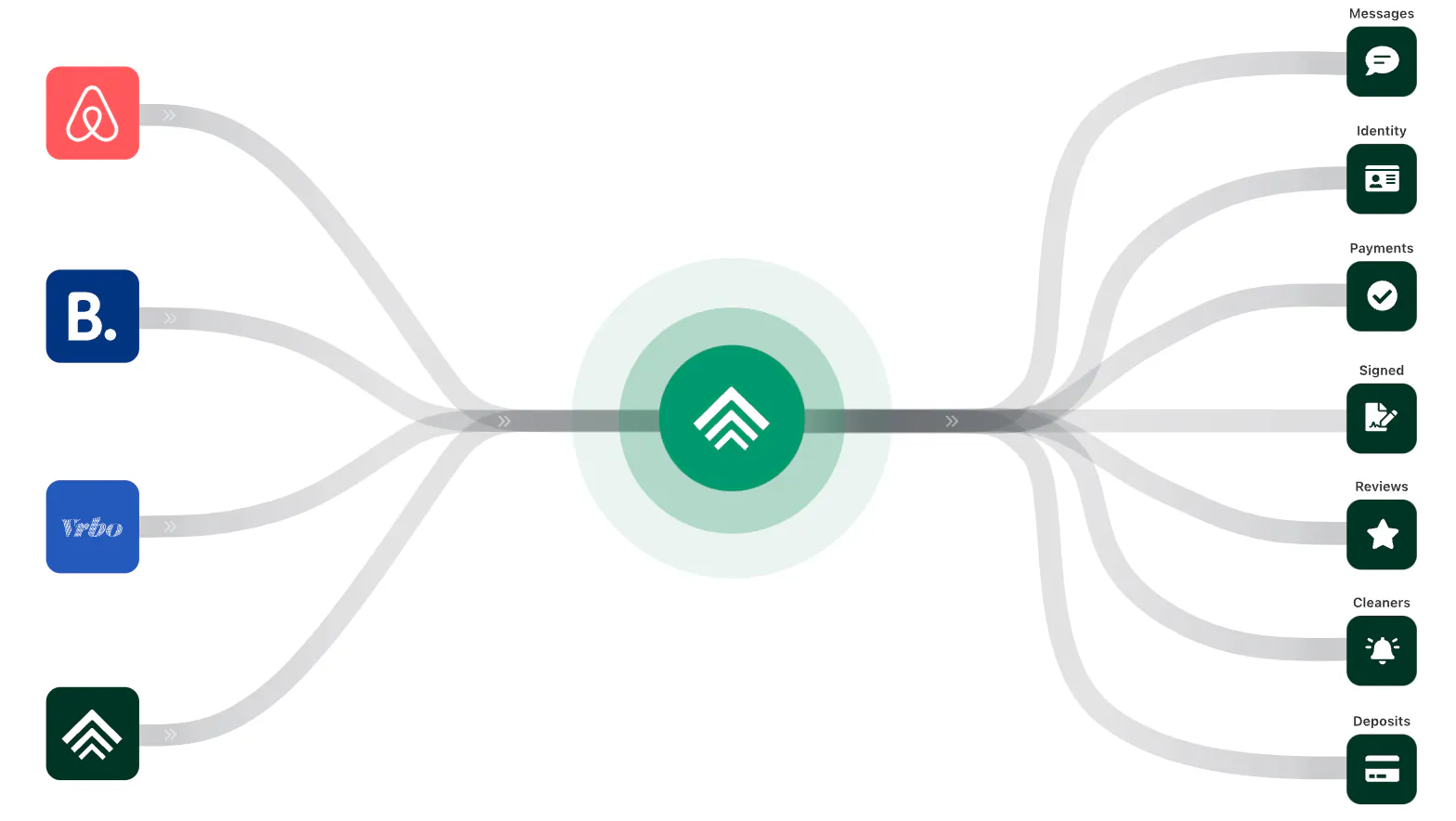
While a property management system is designed to handle the day-to-day operations of your rental business—like booking management, guest communication, and housekeeping coordination—a channel manager focuses specifically on the distribution of your listings across different platforms.
Some PMSs include channel management as a feature, allowing you to manage everything from one system. However, standalone channel managers are also available and may offer more specialized tools and integrations for managing multiple listings.
Benefits of Channel Management Software
Channel management software replaces previously disjointed and manual processes to deliver a number of helpful benefits:
- Increased Listing Visibility: By listing your property on multiple platforms simultaneously, channel management software increases your property's visibility to a broader audience and garnering you more bookings.
- Greater Revenue: Channel management software helps optimize your pricing across platforms based on demand, competitor rates, and other factors, ensuring you charge the ideal rate for your vacation rental at any given time. Make sure to always compare and contrast with the data you’ll find on AirDNA.
- Smoother Operations: Managing listings on multiple short-term rental websites is a difficult and time-consuming balancing act. Channel management software automates that work by synchronizing calendars, automating price updates, and centralizing communication—ultimately, saving you time and hassle.
- Reduced Risk of Double Bookings: By keeping your availability calendars in sync across all platforms, channel management software minimizes the risk of double bookings, which can lead to guest dissatisfaction and potential penalties from platforms.
- Data-Driven Insights: Many channel managers offer analytics and reporting features that shed light into your property's performance across different platforms, helping you make informed decisions about where to focus your efforts.
The Best Channel Management Software

In a sea of channel management software options, Uplisting stands out as the best. Uplisting offers an impressive array of features that simplify the process of listing a short-term rental property on multiple websites, including integrations with major platforms like Airbnb, Vrbo, and Booking.com.
- “[I] relied on [Uplisting] for all my STR needs for almost three years and am happy to note they took care of anything that came up. Happy with their service.” - Trustpilot review
Uplisting sets itself apart with an intuitive interface, which caters to both tech-savvy users and those who prefer a more straightforward approach. Its top-notch customer support is another major plus, offering crucial assistance to short-term rental businesses of all sizes.
- “Having tried software from the biggest names in the VR industry which often come with percentage-based charges, lots of hidden fees and a ton of half-broken features that are just rolled out to add "ticks" to the feature list and never fixed…Uplisting was truly a breath of fresh air and has been our primary PMS system for the past 2 years. Reasonable and crystal clear pricing with features tested properly and rolled out carefully as well as great customer service which actually bothers to follow up with you." - Trustpilot review
Try Uplisting for free
Manage short-term rentals & bookings with the best channel management system
How to List on Multiple Short-Term Rental Sites Using Channel Management Software
While every software differs slightly, the following steps provide a general guide on how to use your channel manager to streamline the process of listing on multiple short-term rental websites:
1. Gather Your Credentials
Before diving into the setup, you’ll need some essential information from each platform you want to connect to. This typically includes your client key, agency ID key, or API credentials. These keys are unique to your account and allow the channel management software to communicate with the listing sites securely. You can usually find this information in your account settings on each platform or by contacting their support team.
2. Connect Your Channel Manager to Listing Sites
Once you have your credentials, log in to your channel management software and locate the section for connecting channels or platforms.
Now you’ll need to establish the connection between each platform and your software:
- Choose the first platform you want to connect (e.g., Airbnb, Vrbo, Booking.com).
- Input the client key or agency ID key for that platform. This will authorize the channel manager to access your account and manage your listings.
- Verify the connection.
- Repeat this process for each additional platform you want to list your property on.
3. Create or Import Listings
Once your channels are connected, you can start creating new listings or importing existing ones. Most channel management software provides an option to either create a new listing from scratch or import listings that are already live on one of your connected platforms.
If you’re creating a new listing, input all the necessary details, such as property descriptions, amenities, pricing, and photos. Ensure that the information is thorough and tailored to attract potential guests.
If you already have a listing on one platform, you can often import it to save time. The software will pull in the data, and you can review and make any necessary adjustments before pushing it live to other platforms.
4. Sync Your Calendars
One of the main benefits of using channel management software is real-time calendar synchronization. After your listings are created or imported, go to the calendar section of your software. Here, you can ensure that all connected platforms are in sync.
Many channel managers automatically sync calendars to prevent double bookings. Verify that this feature is enabled. However, if your software requires it, manually sync the calendars or adjust availability across platforms as needed.
5. Set Up Dynamic Pricing and Rules
Pricing and availability rules will help maximize your revenue and ensure smooth operations across platforms.
Use your channel management software to:
- Adjust your pricing based on demand, seasonality, and market trends. Some software offers dynamic pricing tools that automatically adjust your rates across all platforms.
- Set minimum stay requirements, check-in/check-out times, and other rules that will apply across all your listings. This ensures consistency and reduces the chances of conflicts.
6. Automate Guest Communication
Use your software’s unified inbox to manage messages from all platforms in one place. This makes it easier to stay on top of guest inquiries and booking confirmations.
You can also set up automated responses for common questions, booking confirmations, or check-in instructions to ensure timely and consistent communication.
7. Monitor and Optimize
Finally, regularly monitor your performance across all platforms. Most channel management software provides analytics and reporting features that help you track bookings, revenue, and occupancy rates. Use this data to optimize your listings, pricing, and overall strategy.
The Problem with Listing on Multiple STR Sites Manually
Without the help of a channel manager, it’s easy to get overwhelmed by the complexities of juggling multiple platforms.
Here’s why trying to manage your listings manually can create serious problems:

1. It’s time-consuming. Creating and maintaining listings on multiple sites requires considerable time and effort. Not only is this process tedious, but it also increases the likelihood of inconsistent or outdated information across platforms. A single mistake, like an incorrect detail or a missing photo, can deter potential guests.
2. It requires manual pricing adjustments. Market conditions, local events, and competitor pricing change frequently, requiring constant adjustments. Without a channel manager, you’ll need to log into each platform separately to update rates, which is not only time-consuming but also prone to errors. Missing an update could result in underpricing your property during peak demand or overpricing during slower periods, both of which could hurt your bottom line.
3. It introduces challenges when communicating with guests. When managing multiple platforms manually, you’re forced to check each one individually for messages, increasing the chances of missing a guest inquiry or booking request. Slow response times can lead to poor guest experiences, negative reviews, or even lost bookings, which can damage your reputation and revenue potential.
4. It comes with a high risk of double booking. One of the most significant risks of managing multiple STR platforms without a channel manager is the potential for double bookings. If a guest books your property on one platform, you must quickly update the availability on all other platforms to avoid another booking for the same dates. Without real-time synchronization, it’s easy to overlook this step, leading to double bookings, cancellations, and frustrated guests. This not only results in lost revenue but can also harm your standing with the platforms and your overall guest satisfaction.
5. It makes it difficult to scale your business. As your STR business grows, so does the complexity of managing multiple listings. Manually handling crucial tasks across different platforms becomes increasingly unsustainable. The more properties you manage, the more likely you are to encounter errors, delays, and missed opportunities. This inefficiency can limit your ability to scale your business effectively, as you’ll spend more time on administrative tasks rather than focusing on growth strategies or enhancing the guest experience.
FAQ
Can you list a vacation rental on multiple sites?
Yes, you can list a vacation rental on multiple sites. Doing so can increase your property's visibility and booking opportunities, but managing these listings manually can be challenging. Using channel management software is recommended to streamline the process and avoid potential issues like double bookings.
Can I list on both Airbnb and Vrbo?
Yes, you can list your property on both Airbnb and Vrbo simultaneously. Many hosts choose to do this to reach a broader audience.
Remember to link your Airbnb and Vrbo calendars or use a channel manager to keep your calendars, pricing, and availability synchronized across both platforms.
Is Vrbo or Airbnb better?
Neither platform is inherently better; it depends on your target audience and property type. Airbnb generally appeals to a younger, experience-oriented crowd, while Vrbo is often favored by families and groups looking for traditional vacation homes. You learn more about this in our Airbnb VS Vrbo guide.
What are the best short-term rental sites?
The best short-term rental sites include Airbnb, Vrbo, and Booking.com. These platforms have a broad user base and strong market presence, making them ideal for maximizing your property's exposure and booking potential.
ARTICLE SUMMARY
A step-by-step guide to listing your vacation rental on multiple short-term rental websites, from choosing platforms to using channel management software to streamline operations.
Bram Gallagher
AirDNA Director of Economics and Forecasting
Bram Gallagher is an Economist at AirDNA, specializing in uncovering insights that drive smarter short-term rental decisions. He put his Ph.D. in Economics from the University of Georgia to work researching and forecasting hotel data with CBRE prior to joining AirDNA, as well as teaching economics at a number of universities. In his spare time, Bram enjoys making wooden furniture with hand tools.
