

 Calculate Revenue
 Research Markets
 Find For Sale Properties
 Compare My Listing
 STR Revenue Calculator
 Custom Comp Sets
 Submarket Insights
 Custom Search Filters
 Rate Recommendations
 Performance Benchmarking
 Competitor Comparison
 Owner Contact Details
 Property-level performance data
 Tourism Insights
 Real Estate Investment Analytics
 About Us
 Sales
Sales Support
 Press
PressHow to Remove a Listing from Airbnb in 7 Steps
Published: November 13, 2024
Last updated: September 25, 2026

Bram Gallagher
Key takeaways:
- Hosts can temporarily deactivate or permanently remove Airbnb listings.
- Hiring a property manager or using a co-host can be an alternative to closing your Airbnb due to time management issues.
- Deactivating or deleting your Airbnb account is different from removing a listing.
After hosting countless guests, arranging the perfect throw pillows, and becoming the unofficial Airbnb ambassador of your neighborhood, you’ve decided it’s time for a little break. Maybe you need a breather, maybe it’s time for a renovation, or maybe you’re ready to reclaim your space for yourself (and stop explaining the remote control to strangers). Whatever the reason, if you’re ready to “unplug” your listing, we’re here to walk you through it.
We may be short-term rental nerds here at AirDNA, but that just means we want the best for you—whether that’s powering through your next hosting season or stepping back from the game with confidence. In this guide, we’ll cover the steps to take down your listing temporarily or permanently, along with answers to common questions to help you manage your account stress-free.
How to Remove a Listing from Airbnb
If you’ve decided to remove a listing from Airbnb, here’s how to do it easily:
1. Log in to your Airbnb account.
2. In your dashboard, locate the “Listings” section where all your active properties are displayed.
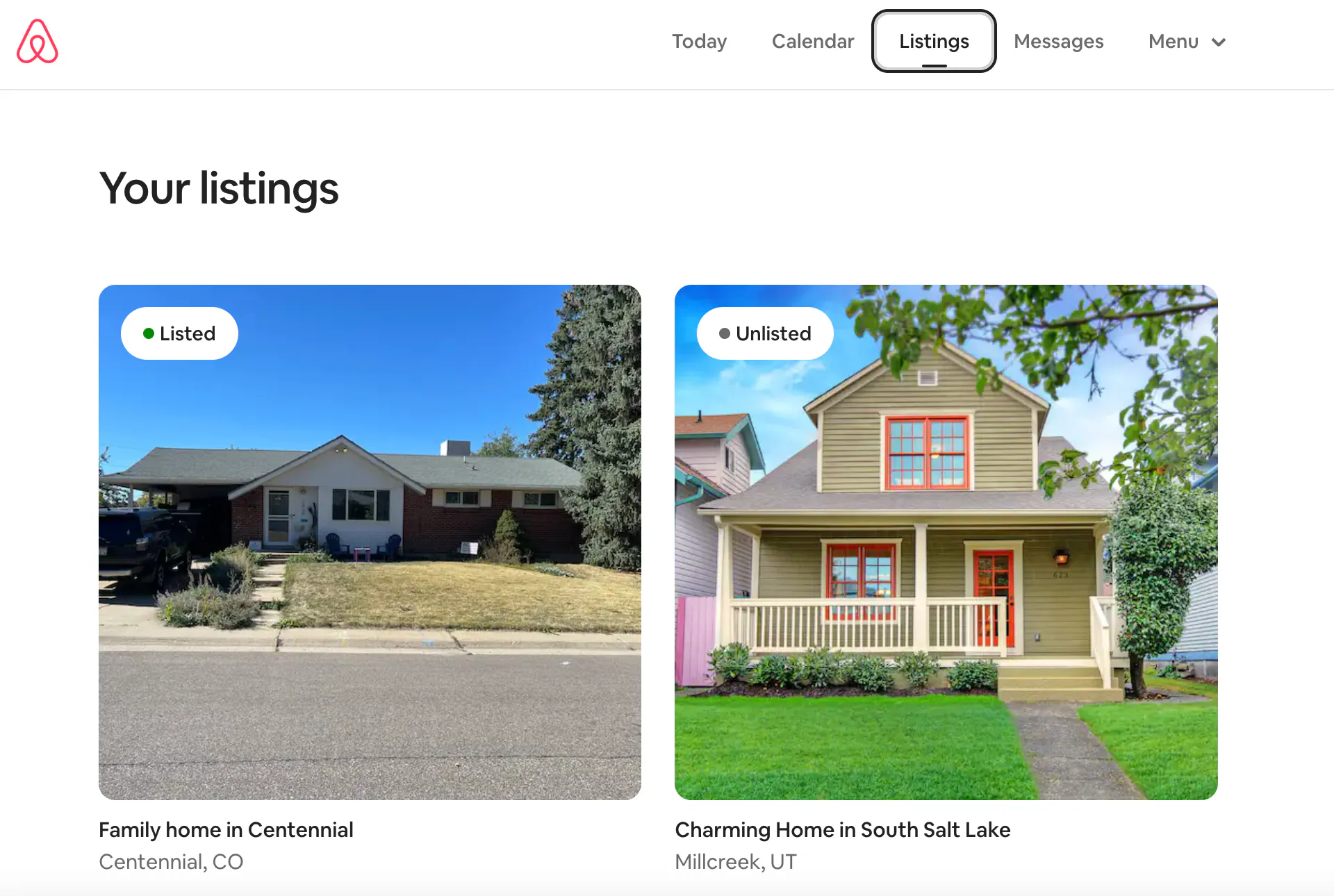
3. Choose the specific listing you’d like to remove.
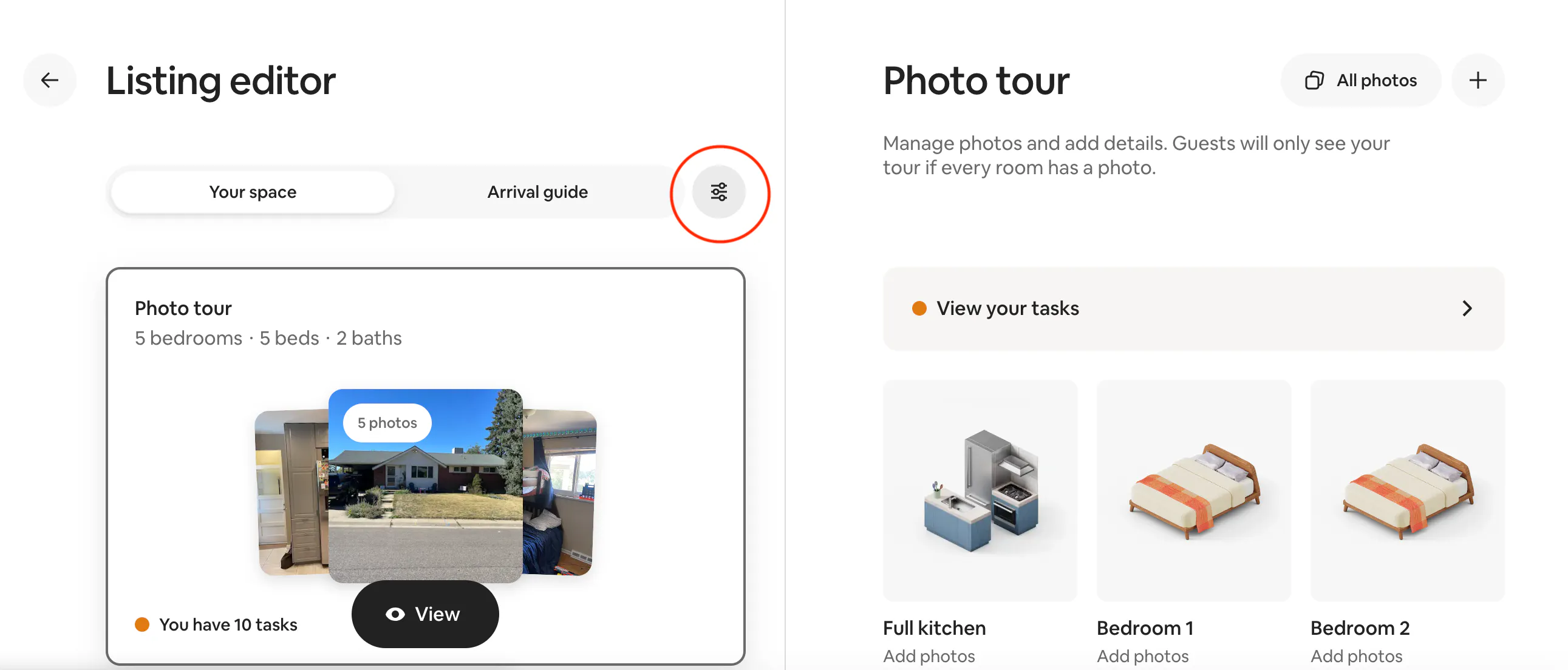
4. In the Listing Editor, click on the hamburger menu for Edit Preferences.
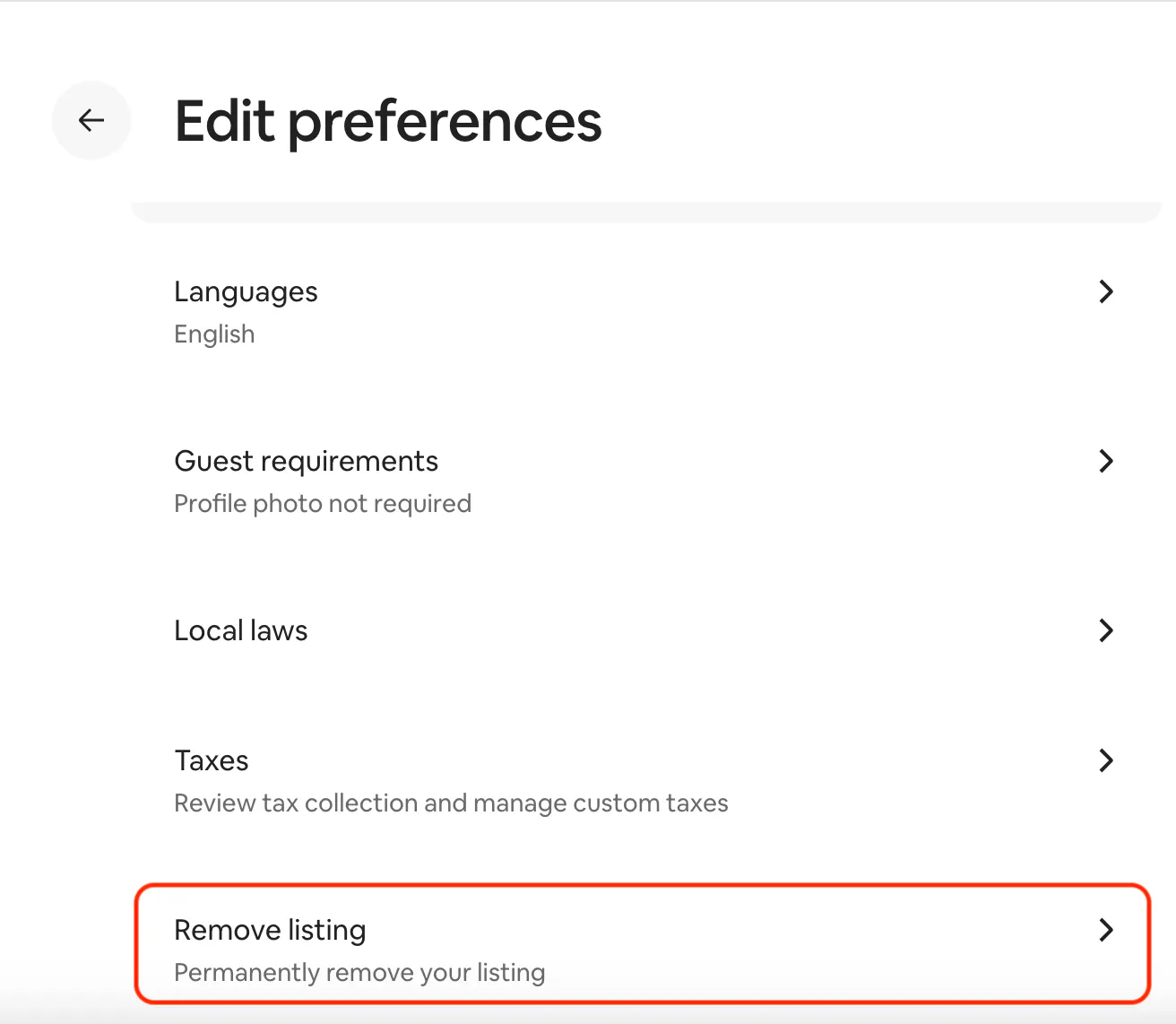
5. Scroll to the bottom of the options under Edit Preferences, scrolling past the Listing status option (more on that later!). Click “Remove listing.”
6. Select the reason you’re removing the listing, then click “Next.”
7. Click “Yes, remove.”
Once removed, your listing will no longer appear in search results, and guests will be unable to book it.
Keep in mind that even if you remove a listing from Airbnb, any associated reviews can’t be deleted and will still appear on your host profile.

Temporary Deactivation vs. Permanent Removal
If you want to close an Airbnb listing, you have two options: temporarily deactivate it or permanently remove it.
- Temporary Deactivation: If you’re only pausing your hosting for a short time, such as during renovations or seasonal breaks, temporary deactivation is a better choice. You can snooze an Airbnb listing, which hides it from search results without deleting any details. This lets you reactivate it later without needing to re-enter information.
- Permanent Removal: Opt for this if you’re permanently closing the listing and do not intend to reopen it. Once removed, the listing is gone from your account, and guests won’t be able to access it again.
How to temporarily deactivate an Airbnb listing
If you intend to reactivate your Airbnb listing in the future, you have two options:
- Deactivate it for a specific amount of time (up to 6 months)
- Deactivate it indefinitely, then manually reactivate it when you’re ready
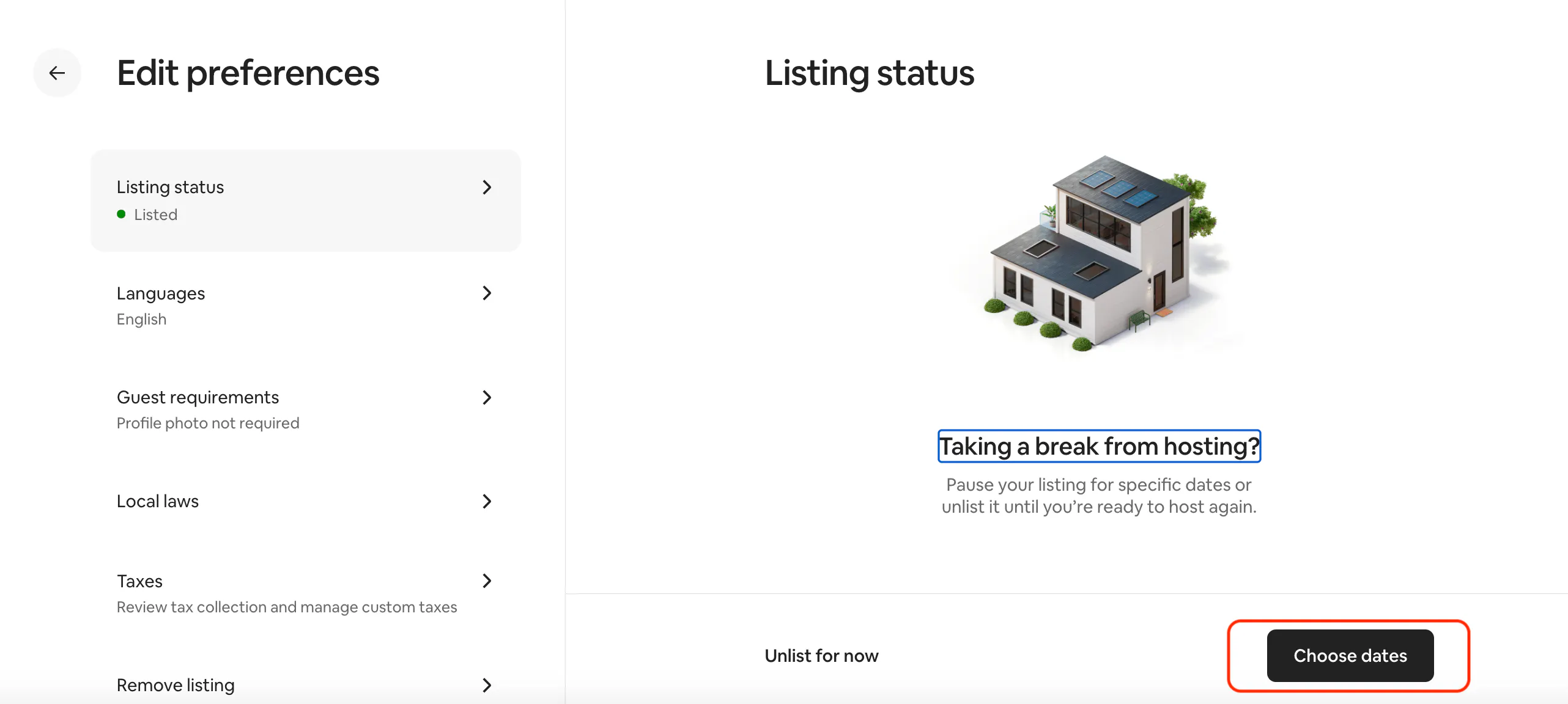
To temporarily deactivate a listing on Airbnb for a set amount of time:
1. Click “Listings” and select the listing you want to snooze.
4. In the Listing Editor, click on the hamburger menu for Edit Preferences.
3. Click “Listing status”
4. Click “Unlisted” and then click “Choose dates”
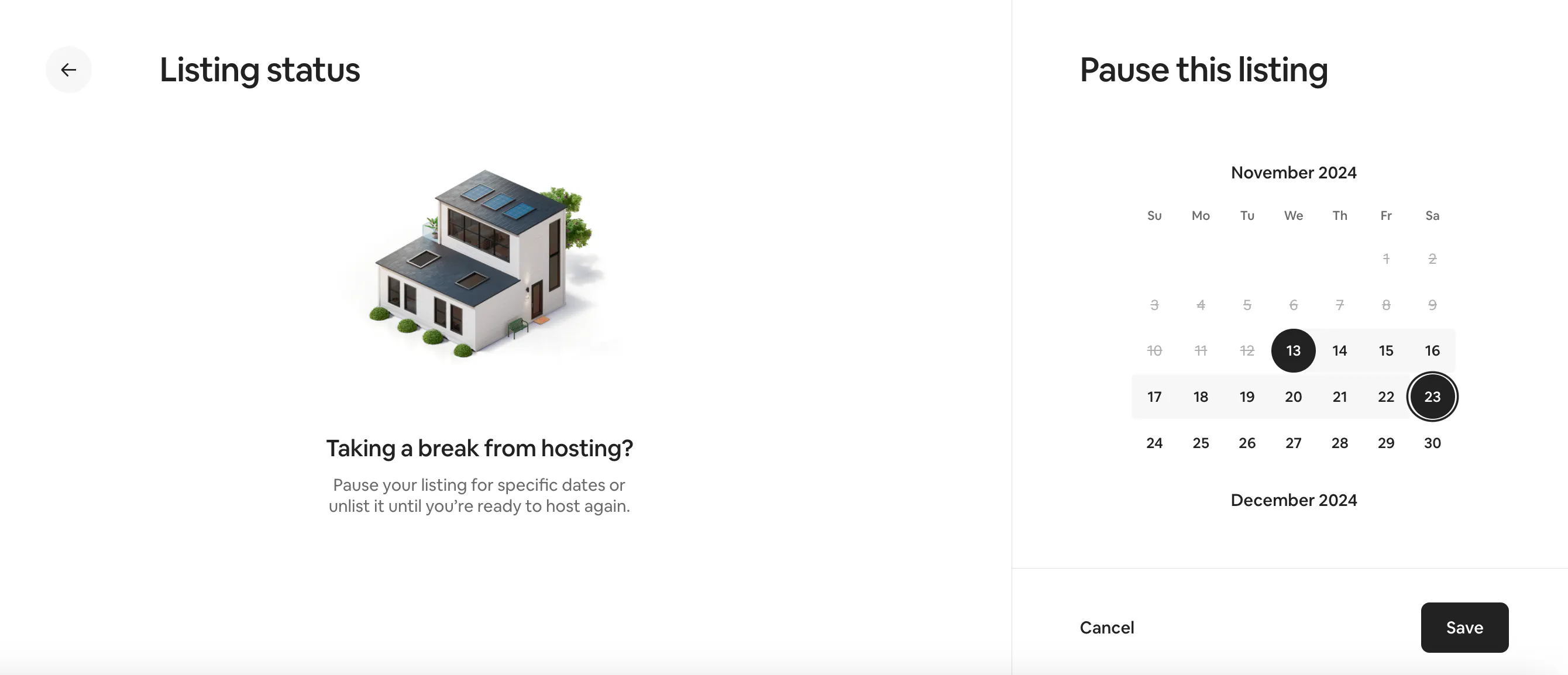
5. Set the start and end dates for which you want to unlist your Airbnb, then click “Save.”
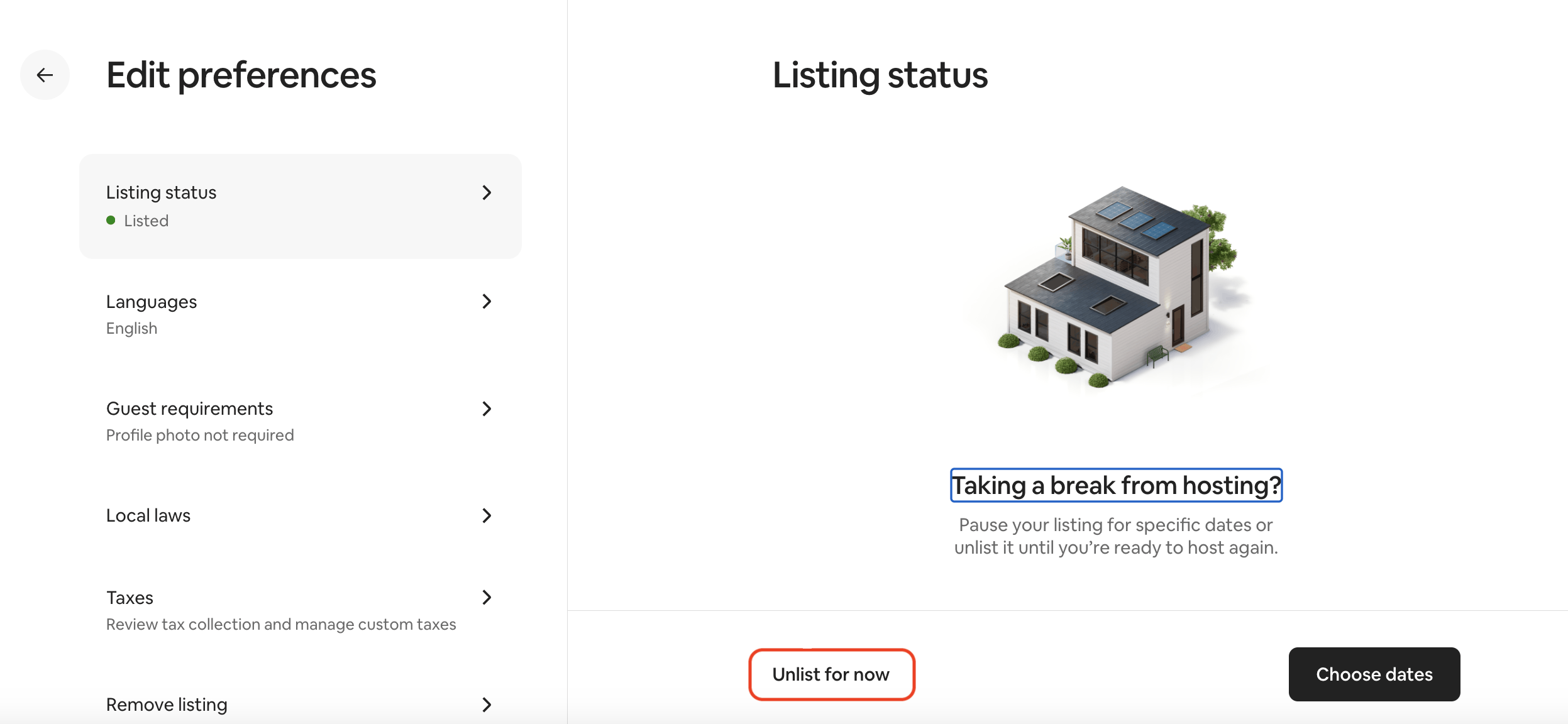
To temporarily deactivate an Airbnb listing indefinitely:
1. Click “Listings” and select the listing you want to snooze
2. Under “Listing editor,” click “Edit preferences”
3. Click “Listing status,” which is the first option under Edit preferences
4. Click “Unlisted,” then click “Unlist for now”
5. Choose the reason you’re snoozing the listing, then click “Unlist”
Why Hosts May Need to Remove a Listing from Airbnb
There are a variety of situations that might lead a host to close an Airbnb listing.
Common reasons for removing an Airbnb listing
- Property Renovations: Extensive property renovations might make the home temporarily unfit for guests.
- Taking a Break: Sometimes hosts need a pause, whether for personal reasons, travel, or a busy schedule.
- Property Changes: If you’re selling or repurposing the property, removing the Airbnb listing makes sense.
Airbnb also gives you these options for why you changed your mind about hosting:
- I’m no longer able to host.
- I expected more from Airbnb.
- I’m not ready to host right now.
- I was hoping to make more money.
- I expected things to go more smoothly with guests.
- This is a duplicate listing.
Alternatives to removing your listing from Airbnb
If your primary reason for removing the listing is due to time constraints or management challenges, there are alternatives to consider:
- Hire a Property Manager: Many hosts work with professional property managers who can handle guest communication, cleaning, and other time-consuming tasks.
- Find a Co-Host: Airbnb allows hosts to designate co-hosts who can help manage the property. In fact, Airbnb offers a Co-Host Network that makes it easy to find and hire a top-rated co-host to help you manage your listing.
- Use a Property Management System (PMS): Vacation rental software like Uplisting offers tools and automations that make it easier to handle bookings, payments, and guest interactions.
Managing Other Account Changes on Airbnb
Aside from listing management, hosts may also want to make changes to their overall account. Here are some useful tools and settings:
How to deactivate an Airbnb account
Deactivating an Airbnb account hides your entire profile, rather than hiding or removing a single listing. If you intend to use your Airbnb account sometime in the future, you can temporarily deactivate it. Here’s how:
1. Click “Profile”
2. Click “Account”
3. Click “Login & security”
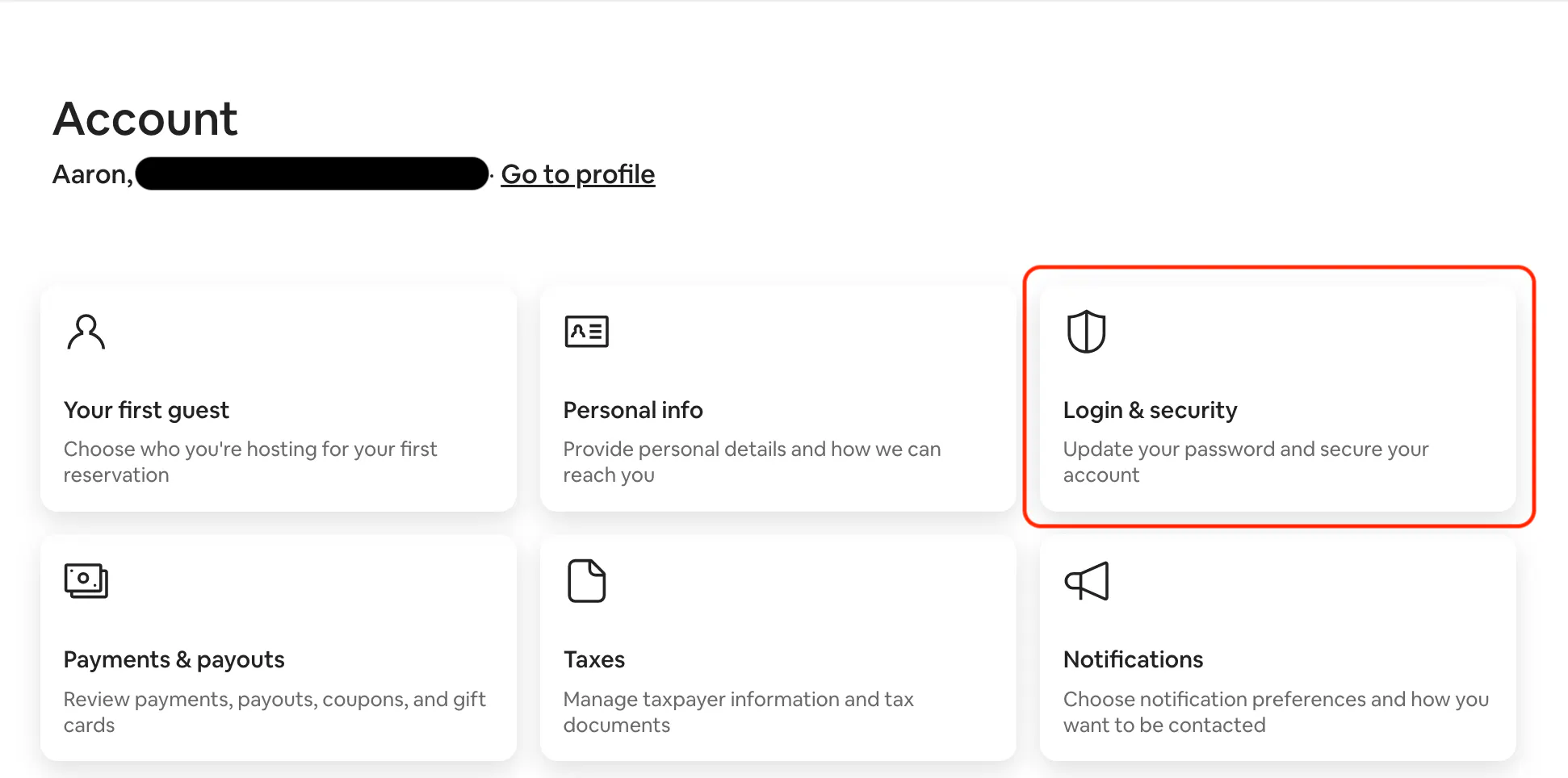
4. Under “Account,” click “Deactivate.”
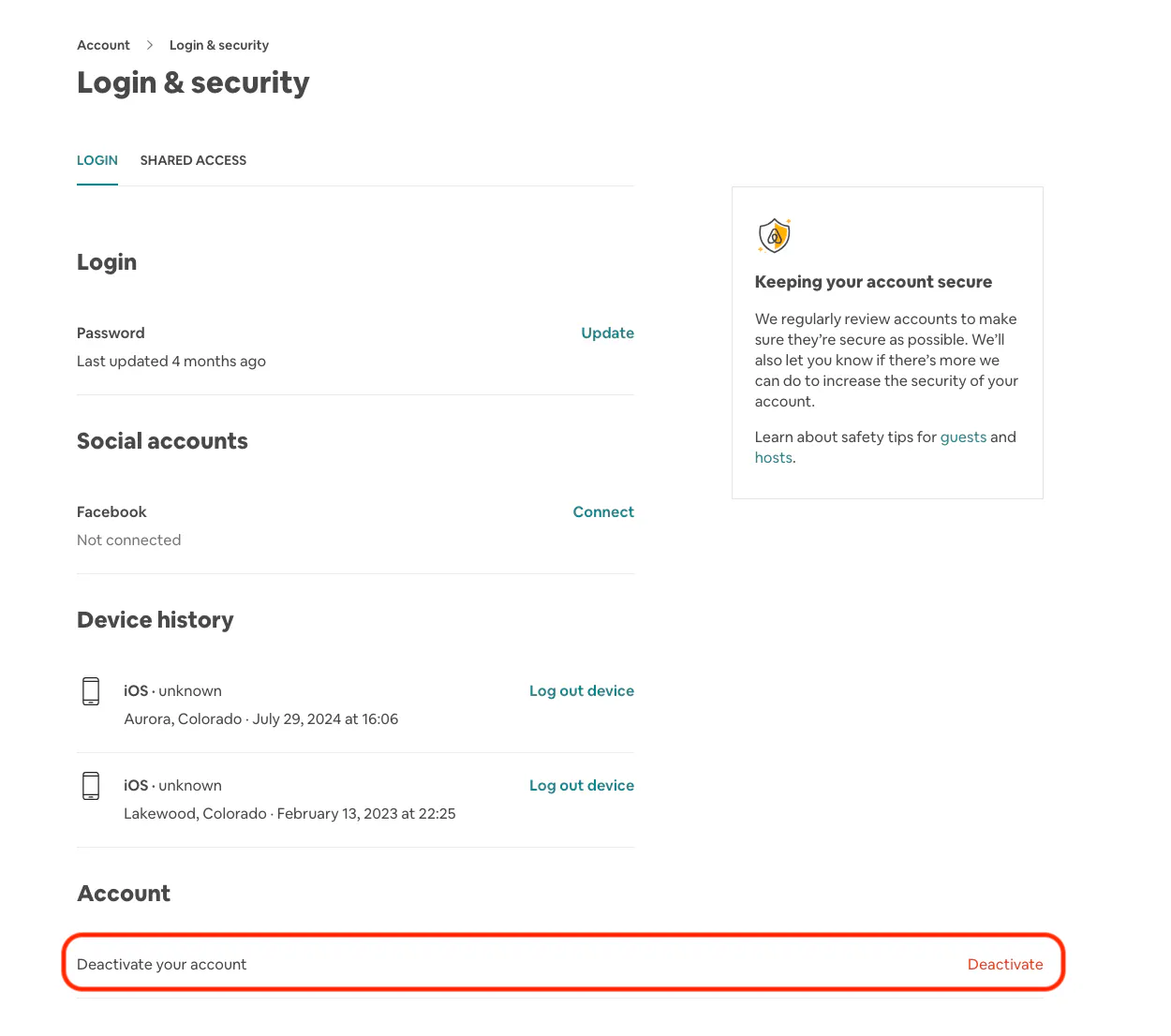
5. Select your reason for deactivating, then click “Continue.”
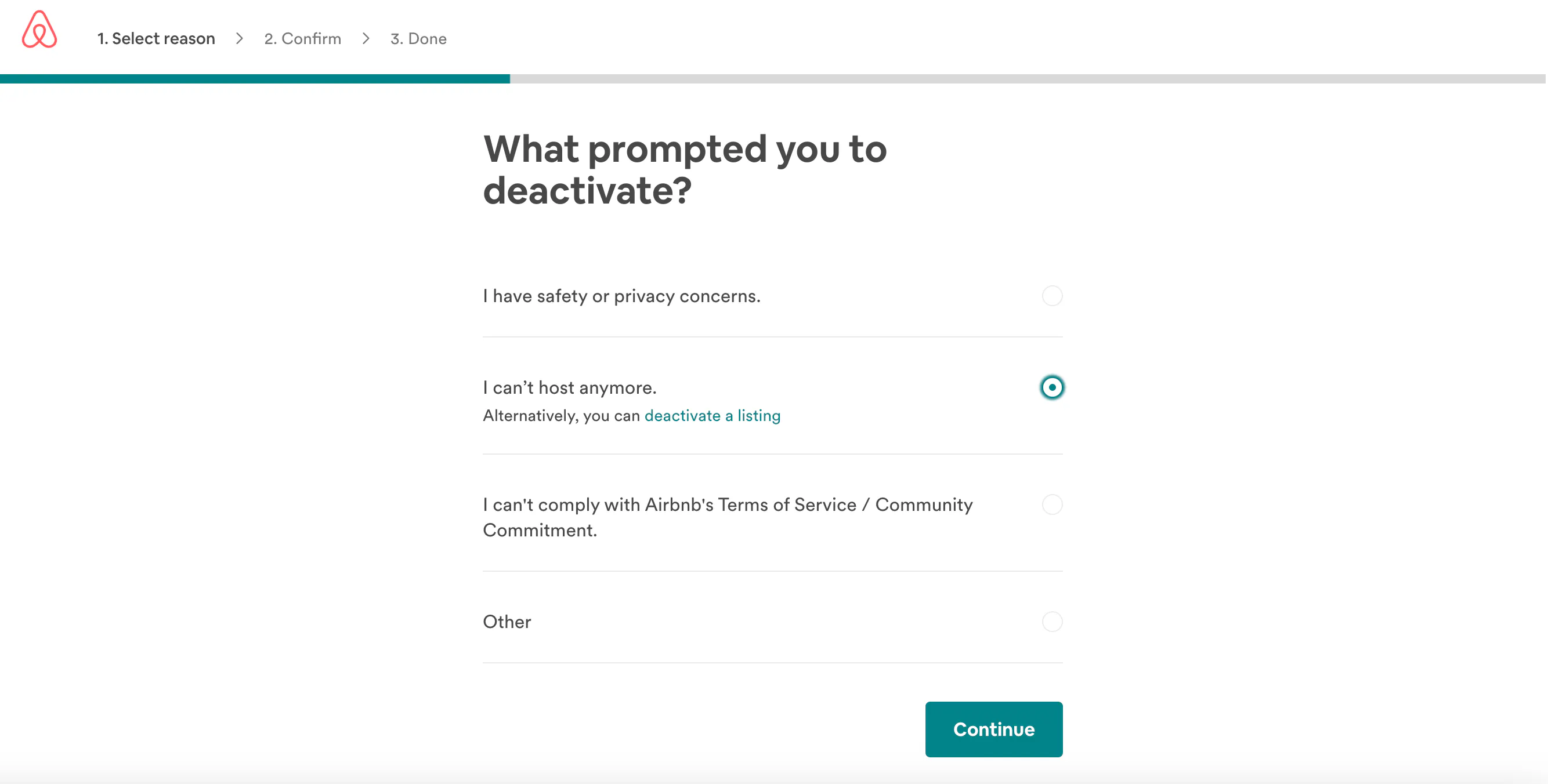
6. Follow Airbnb’s prompts to confirm that you want to deactivate your account.
Keep in mind that deactivating simply hides your account—Airbnb will retain your data and your account.
How to close an Airbnb account
If you want to permanently shut down an Airbnb account, follow these steps:
1. Click “Profile”
2. Click “Account”
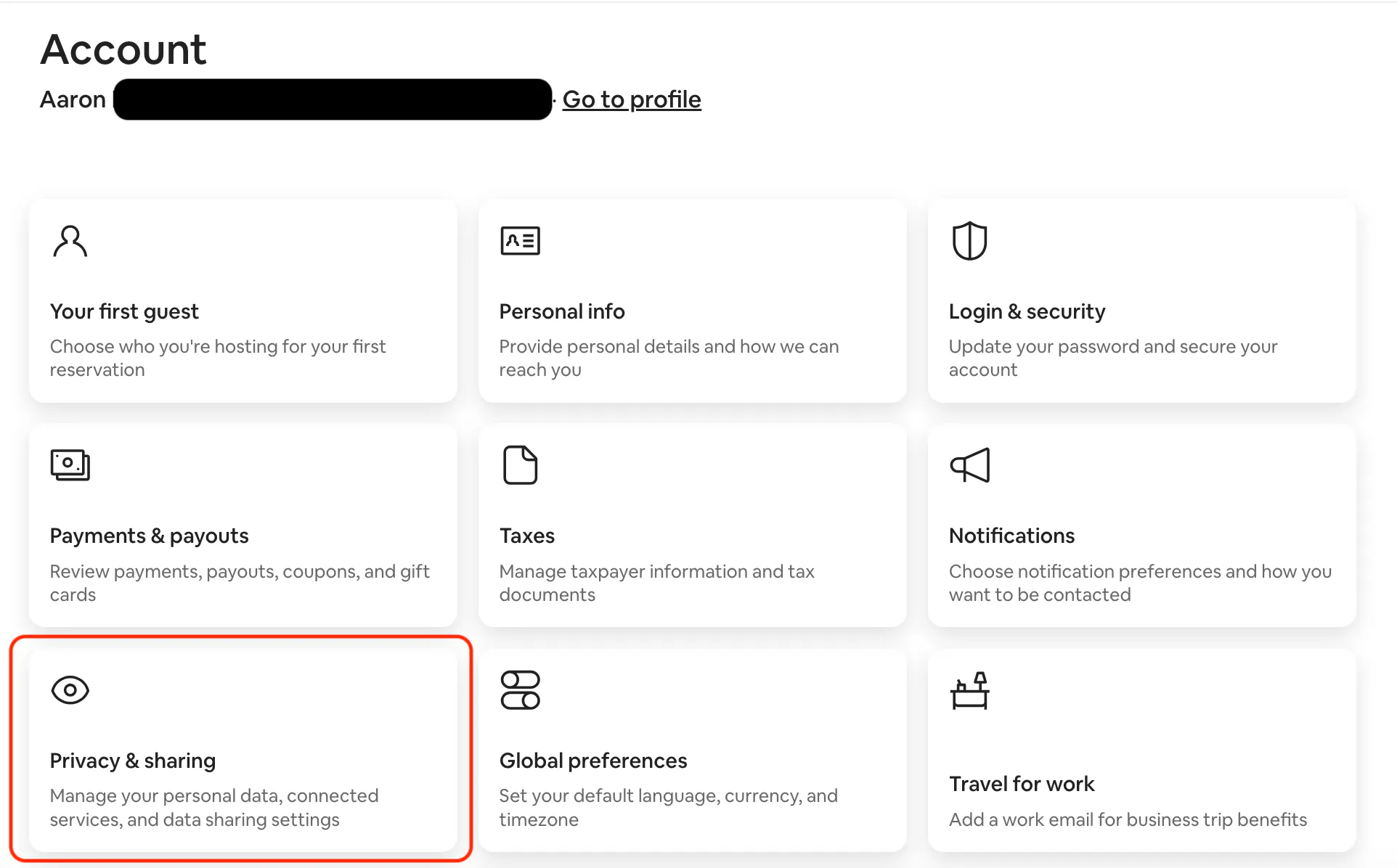
3. Click “Privacy & sharing”
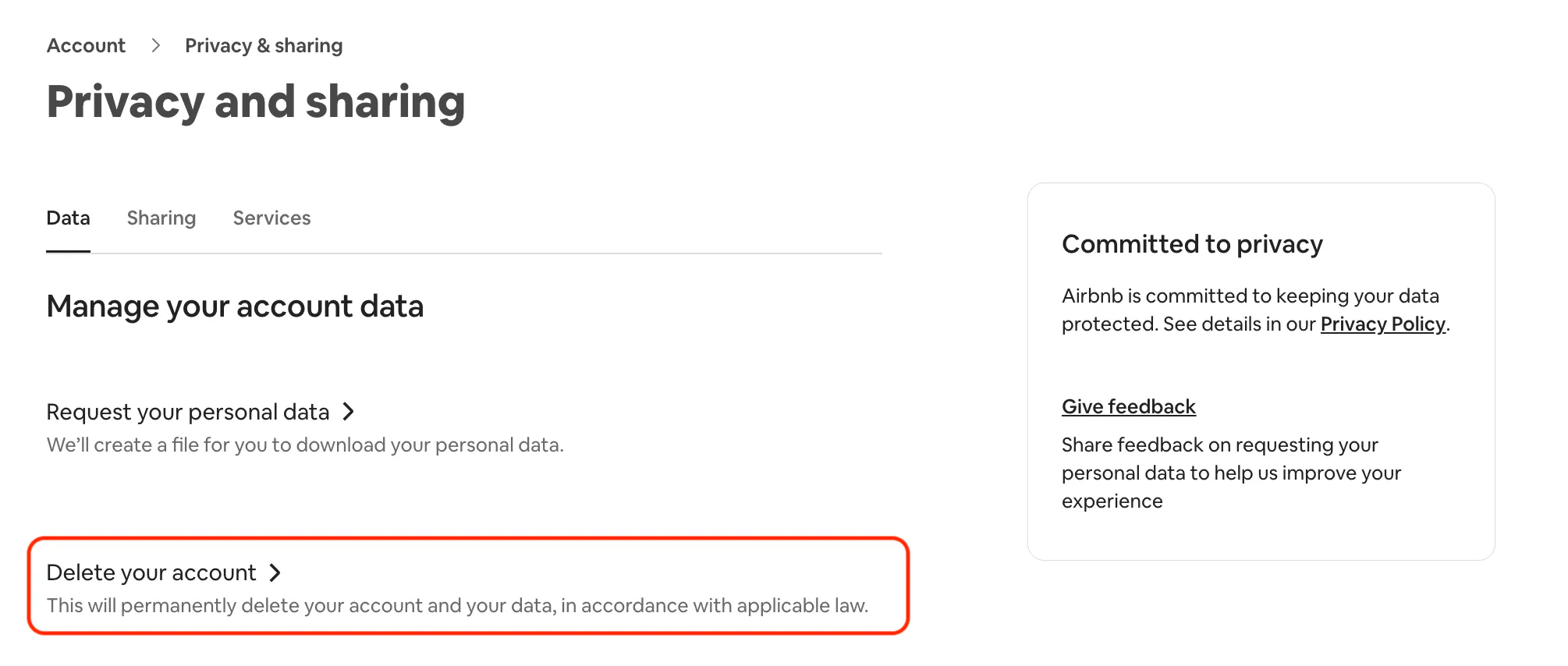
4. Under “Manage your account data,” click “Delete your account”
5. Choose the country and state that you live in.
6. Select a reason why you deactivated your account (this is optional!)
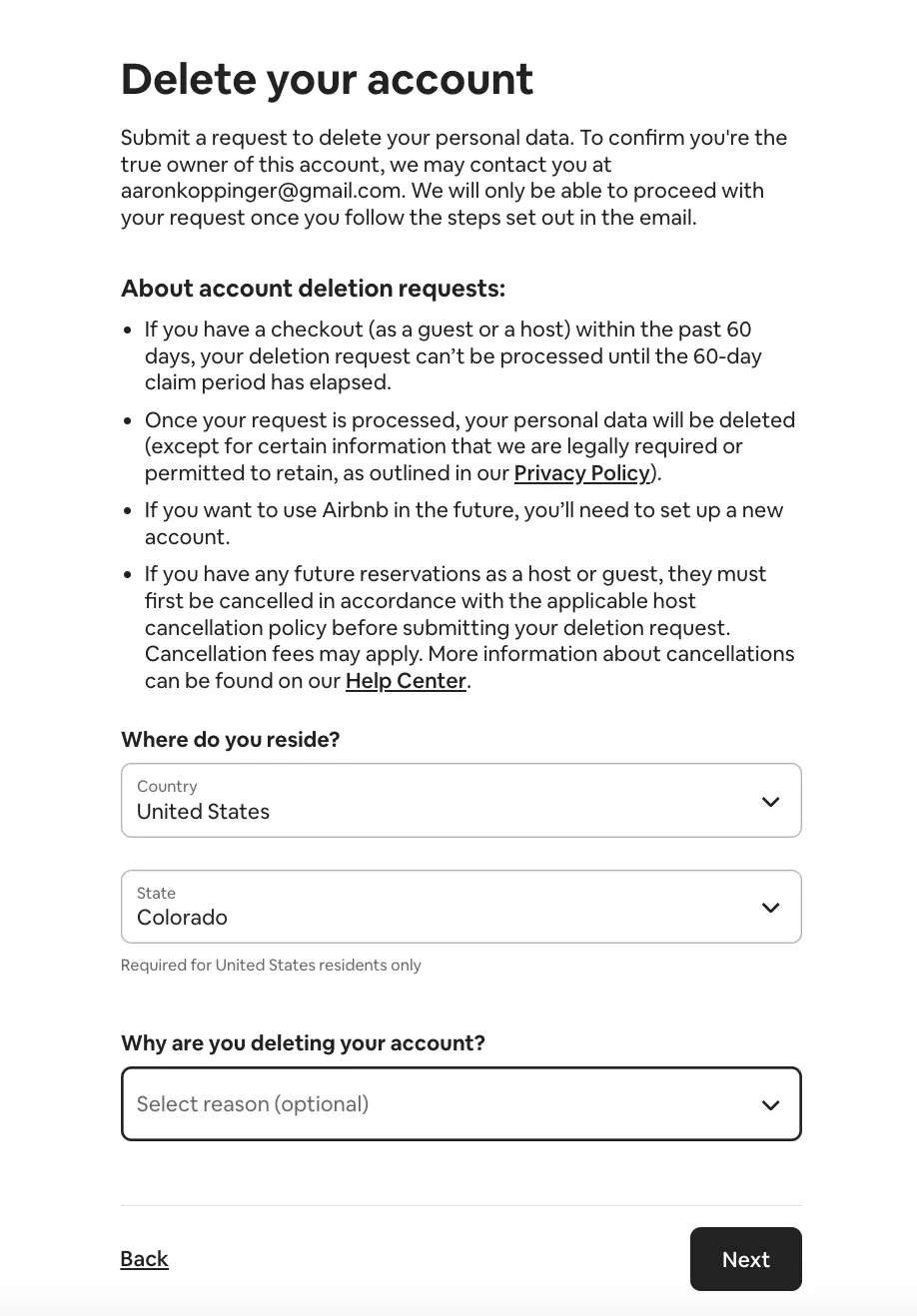
7. Click “Next”
8. Click “Delete account”
FAQ
Why is my Airbnb listing not showing up?
If your listing isn’t appearing in search results, double-check its visibility settings. Listings may not show up if they’re set to “Snooze” or if availability is restricted by blocked dates.
If your new listing isn’t showing up in search results, it could just be a processing delay. Airbnb needs some time—typically 72 hours—to process and verify new listings before they’ll start showing up.
How can I find my Airbnb account?
If you can’t locate your account, use the “reset your password” option. Enter your email, and Airbnb will send a recovery link to help you log back in.
Why is my Airbnb account locked?
The most likely reason why an Airbnb account is locked is due to security reasons. Airbnb may temporarily lock an account if they notice suspicious log-in behavior, such as entering an incorrect password too many times.
You may have to contact Airbnb Support to unlock your account, which generally requires verifying your identity and changing your password.
Airbnb removed my account. Now what?
Airbnb reserves the right to deactivate or delete accounts that they find to be in violation of their terms of service. Airbnb might also remove an account if its associated listings have repeatedly been suspended, or if its ratings are below 99% of all other Airbnb ratings.
If your Airbnb account was removed, start by contacting Airbnb Support. Ask them to explain why the account was deactivated.
If you believe your account was wrongly removed, you can appeal the decision. The appeal process involves providing additional information and evidence to support why you feel your account was wrongly deactivated. If your appeal is successful, Airbnb will reactivate your account.
ARTICLE SUMMARY
Whether you're ready for a hosting hiatus or it's time to close the Airbnb chapter entirely, this guide walks you through the steps to temporarily deactivate or permanently remove your listing. Find out what option fits best and how to handle it all, no stress involved.
Bram Gallagher
AirDNA Director of Economics and Forecasting
Bram Gallagher is an Economist at AirDNA, specializing in uncovering insights that drive smarter short-term rental decisions. He put his Ph.D. in Economics from the University of Georgia to work researching and forecasting hotel data with CBRE prior to joining AirDNA, as well as teaching economics at a number of universities. In his spare time, Bram enjoys making wooden furniture with hand tools.
